Where Can I View or Action (Accept/Decline) a Fee Quote For a Voucher Request?
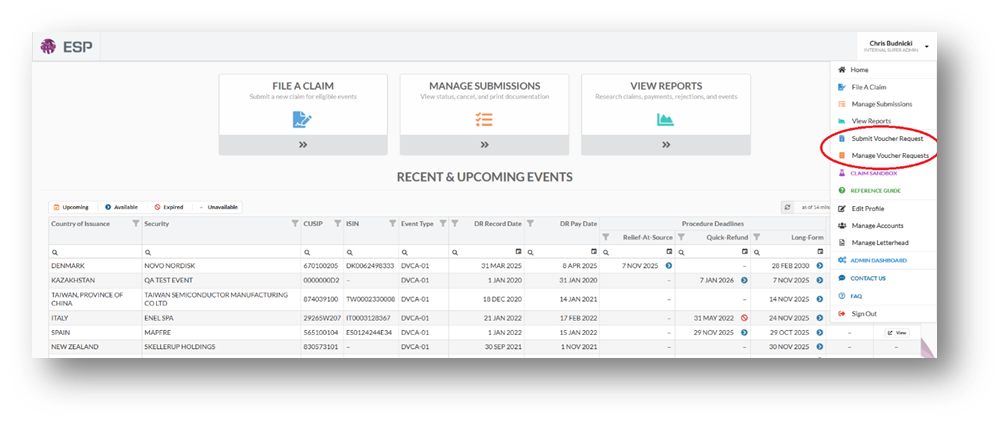
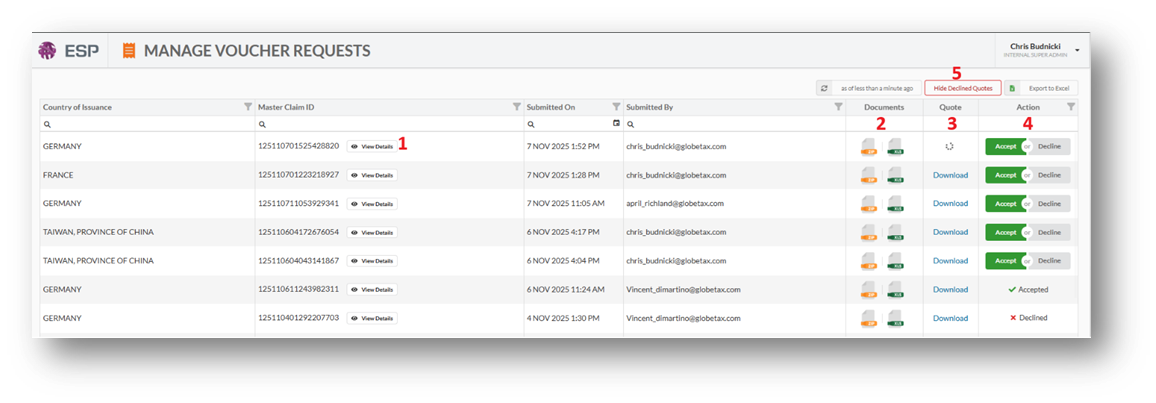
The Manage Voucher Requests Screen is where you will be able to view and action the quote once it has been generated.
View Details
Clicking View Details will open a pop up that will allow you to see the individual event details included in the submission
Documents
Clicking the Orange Zip File will allow you to access the documents generated to support your request.
Clicking the Green XLS File will allow you to download and view the accepted submission file.
Quote
While the quote is being created you will see a buffer wheel.
Once the quote has been created you will be able to click Download to view the quote.
Action
Clicking Accept will send a notification to the appropriate team notifying them to review the claim details and quote. If any issues are found with the data, they will reach out with clarifying questions otherwise they will reach out to provide the quote.
Clicking Decline will send a notification to the appropriate team notifying them to reject the claim details and close out this request. A new submission will need to be made to reopen the request.
Show/Hide Declined Quotes
This toggle will allow you to show or hide previously declined quotes.